
A pump stops at 2 a.m. The technician on call cannot find the last service date. The part is not on the shelf, and the person who tracked the schedule is on leave. Nothing about that failure is unusual, and almost all of it is a records problem before it is a mechanical one.
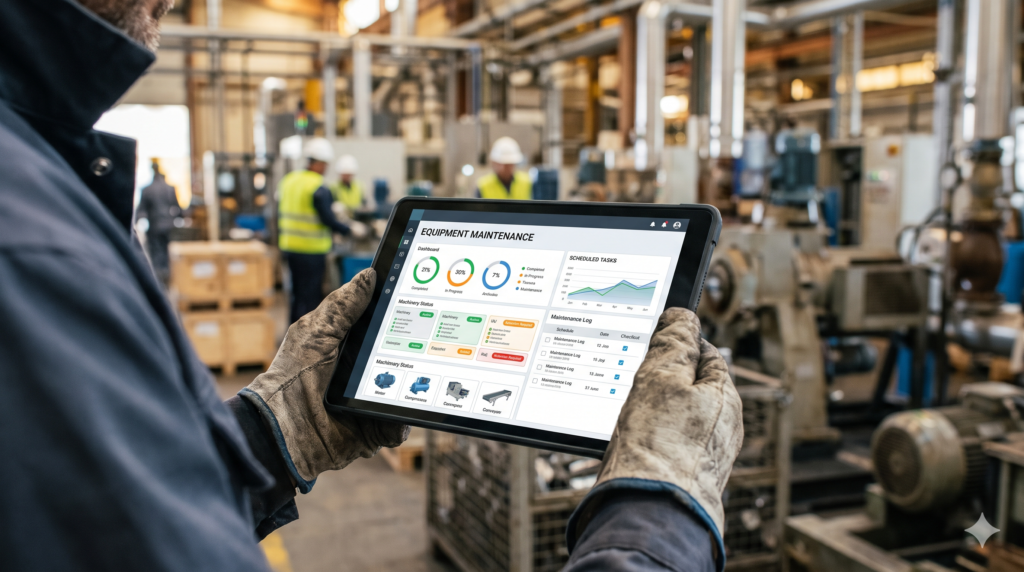
Equipment maintenance software is a system that tracks your assets, schedules preventive work, manages work orders, controls spare parts and keeps a service history for every machine. It replaces whiteboards, spreadsheets and paper logs with one shared record that the office and the field can both trust.
This guide explains what the software does, which features matter, how maintenance strategies fit in, which KPIs to track, what it really costs, how to choose a system in seven steps and how to roll it out without stopping work. It is written for maintenance managers, operations leads and owners of small and mid-size operations who want a clear, vendor-neutral view before they sit through a demo.
What Is Equipment Maintenance Software?
Equipment maintenance software is a digital system that helps teams track equipment, plan and schedule maintenance, assign and close work orders, manage spare parts and record service history so that breakdowns are caught earlier and repairs are better documented.
Most tools in this category are built on a computerized maintenance management system, usually shortened to CMMS. Buyers tend to search for the plain-language term, while vendors tend to use the acronym, so you will see both used for the same kind of product.
Five jobs sit at the center of almost every platform:
- Keeping an asset register with a full history for each machine.
- Creating, assigning and tracking work orders.
- Scheduling preventive maintenance by date, usage or condition.
- Tracking spare parts and consumables.
- Reporting on downtime, cost and completion.
Maintenance teams, facilities managers, fleet operators, plant engineers and field service companies all use it. The common thread is physical equipment that costs money when it stops.
Equipment Maintenance Software vs CMMS vs EAM
The three labels overlap, and the difference is mostly scope. A CMMS focuses on keeping assets running day to day. Enterprise asset management (EAM) covers the whole asset life, including purchasing, depreciation and financial reporting. Equipment maintenance software is the everyday name for whichever of these a buyer needs.
| Capability | CMMS software | EAM software |
|---|---|---|
| Main focus | Day-to-day maintenance and work orders | Full asset lifecycle and capital planning |
| Typical user | Maintenance and operations teams | Enterprise asset and finance leaders |
| Typical scope | One site to mid-scale multi-site | Complex, multi-site, high-value assets |
| Reporting depth | PM completion, MTTR, backlog | Total cost of ownership, depreciation, return on assets |
Most teams reading this need a CMMS. EAM becomes the better fit when asset value, compliance and financial reporting outgrow what a maintenance-focused tool covers.
Do You Need Equipment Maintenance Software or Is a Spreadsheet Enough?
A spreadsheet can carry a small operation for a while. The question is whether it is still carrying yours. These six signs usually mean it is not:
- Preventive tasks are missed because one person holds the schedule in their head or on a calendar.
- You cannot pull the full service history of a single machine in a couple of minutes.
- The same equipment keeps failing and nobody can see the pattern.
- Technicians discover mid-repair that the part is out of stock.
- There is no audit trail for inspections, warranty claims or compliance checks.
- Technicians write notes on paper and someone re-types them later.
| Situation | Spreadsheet may be enough | Software is worth it |
|---|---|---|
| Number of assets | A small, stable list | A growing list or several sites |
| Maintenance team | One planner who knows every machine | Several technicians and shifts |
| Risk of failure | Low, with cheap and quick repairs | High cost of downtime or safety exposure |
| Records needed | Informal | Audit-ready history |
Treat any asset count as a rule of thumb and adjust it to the cost of a breakdown in your operation. If you are weighing the wider move away from manual processes, our guide to small business automation covers where digitizing a process pays off first.
Waiting has a cost. Small gaps such as a missed inspection or a missing part compound into unplanned stops, and unplanned work is almost always more expensive than planned work.
Core Features of Equipment Maintenance Software
Platforms differ in polish and price, but the useful features are consistent. Use the sections below as a checklist when you compare tools.
Asset Management and Equipment History
The asset register is the foundation. A good one lets you organize equipment in a hierarchy, such as site, line, machine and component, and attach service history, warranty dates, manuals and photos to each record. QR or barcode labels let a technician scan a machine and open its history in seconds, which is where most of the time savings in the field come from.
Work Order Management
Work orders turn a problem into tracked work. The software should handle the request, approval, assignment, priority, completion notes, labor hours and parts used. A request portal lets operators who are not technicians report an issue without a licence. Look for clear workload views so a planner can see who is overloaded, and for scheduling that connects to a broader labor management system approach if you manage labor across shifts.
Preventive Maintenance Scheduling
Preventive maintenance (PM) software generates work on a schedule so that nothing depends on memory. There are three common triggers:
- Calendar: every three months, every Monday.
- Meter or usage: every 500 run hours, every 10,000 miles.
- Condition: when a reading drifts outside a set range.
Reusable task templates and checklists by asset type keep the work consistent. Calendar-only PM tends to over-service some machines and miss failures on others, so check that the tool can use meter readings at least.
Spare Parts and Inventory
Parts should be linked to assets and work orders, with minimum and maximum levels and reorder points. Treat stocking spares as a maintenance decision first and a purchasing decision second, because a missing part turns a one-hour fix into a one-day stop. The same logic applies to the storeroom as to any stock room, so our guide to inventory control methods is a useful companion for setting reorder rules and counting cycles.
Mobile Access, Offline Mode and Documents
Technicians work on shop floors, in basements and at remote sites. A mobile maintenance app should let them create and close work orders, attach photos, scan assets and open manuals. Offline queueing matters wherever signal is weak, because the data syncs when the connection returns. Test the app in the real environment, not in a demo room.
Reporting and Dashboards
Dashboards should answer the questions that run your week: how much work is open, how much PM is overdue, which assets cost the most and how much downtime you had. The KPI section below shows how to calculate the main figures.
Compliance, Inspections and Audit Trails
Digital inspection checklists can require a photo or a signature before a job closes. Timestamped records give you evidence for audits and warranty claims. If you operate in a regulated setting, ask the vendor which records the software keeps and how long, and confirm the requirements that apply to you with the relevant authority.
Feature Checklist for Demos
| Feature | What to verify in a demo |
|---|---|
| Asset register | Hierarchy, history, attachments and QR lookup |
| Work orders | Request to close on a phone, with parts and labor logged |
| PM scheduling | Calendar and meter triggers, with reusable templates |
| Parts | Reorder points and parts linked to work orders |
| Mobile | Offline use, photos and scanning in your environment |
| Reporting | Downtime, PM compliance and cost per asset without exports |
| Audit trail | Who changed what, and when |
Maintenance Strategies the Software Supports
Software does not choose your strategy, but it determines which strategies you can run. There are four main ones.
| Strategy | What triggers the work | Best for | What the software must support |
|---|---|---|---|
| Reactive | A failure | Low-cost, non-critical assets | Fast work order creation and history |
| Preventive | Calendar or usage | Most routine equipment | PM scheduling with date and meter triggers |
| Condition-based | A reading crosses a threshold | Critical assets with measurable wear | Sensor or meter data and alert rules |
| Predictive | A model forecasts a failure | High-value assets with good data history | Data integration and analytics |
Predictive and condition-based maintenance need sensor or meter data, so they are not a default setting you switch on. A sensible path is to start with preventive maintenance, add meter readings, and then add condition data on your most critical assets only. That keeps cost and complexity matched to the risk.
Benefits and ROI of Equipment Maintenance Software
The practical benefits are consistent across industries:
- Fewer unplanned breakdowns, because routine work gets done on time.
- Longer asset life, because equipment receives consistent care.
- More planned and less emergency work, which reduces overtime and rush parts costs.
- Better parts planning, with fewer stockouts and less obsolete stock.
- Audit-ready records for inspections, warranty claims and compliance.
- One shared view of what is open, overdue and done.
To estimate return, use a simple formula:
ROI = (annual savings minus annual cost) divided by annual cost
Here is a worked example. The numbers are illustrative only, so replace them with your own.
| Input | Illustrative value |
|---|---|
| Unplanned downtime today | 120 hours per year |
| Cost of an hour of downtime | $400 |
| Assumed reduction in unplanned downtime | 30 percent |
| Downtime savings | 36 hours x $400 = $14,400 |
| Overtime and rush-parts savings (assumed) | $3,000 |
| Total annual savings | $17,400 |
| Annual licences (8 users at $55 per month) | $5,280 |
| One-time implementation in year one (assumed) | $2,000 |
| Year-one cost | $7,280 |
| Year-one ROI | (17,400 minus 7,280) divided by 7,280, about 139 percent |
The assumed 30 percent reduction is a planning input, not a promise. Use your own downtime records to set it, and be conservative.
Key KPIs to Track: MTBF, MTTR and PM Compliance
You cannot improve what you do not measure. These are the core figures, and your software should produce them without manual exports.
| KPI | Formula | What it tells you |
|---|---|---|
| MTBF (mean time between failures) | Total operating time divided by number of failures | How reliable an asset is |
| MTTR (mean time to repair) | Total repair time divided by number of repairs | How quickly you recover |
| PM compliance | PM tasks completed on time divided by PM tasks scheduled, times 100 | Whether preventive work is actually happening |
| Planned vs unplanned work | Planned work hours divided by total work hours | How reactive the team is |
| Maintenance backlog | Open work orders, ideally in labor hours | Whether capacity matches demand |
| Cost per asset | Labor plus parts plus contractor cost per asset | Which equipment drains the budget |
A worked example, again with illustrative figures: a machine runs 2,000 hours in a quarter and fails 4 times, and the 4 repairs take 12 hours in total. MTBF is 2,000 divided by 4, which is 500 hours. MTTR is 12 divided by 4, which is 3 hours. If 90 PM tasks were scheduled and 81 were completed on time, PM compliance is 90 percent.
Track these as a routine, not a one-off report. Tracking them consistently is a form of business process monitoring, and the trend matters more than any single month.
How Much Does Equipment Maintenance Software Cost?
Pricing falls into four models: per user, per asset or vehicle, tiered plans, and quote-based enterprise pricing. Per-user pricing is the most common for general CMMS tools, while fleet tools often charge per vehicle.
The table below shows starting list prices as published in comparison pages from July to September 2026. Prices change, so confirm current terms with each vendor before you decide.
| Tool | Free plan | Entry paid plan | Next plan | Notes |
|---|---|---|---|---|
| Coast | Yes | $2 per user per month | $4 per user per month | Higher tiers by quote |
| MaintainX | Yes | $20 per user per month billed annually | $65 per user per month billed annually | Enterprise by quote |
| UpKeep | No (trial) | $24 per user per month | $55 per user per month | Higher tiers by quote |
| Fiix | Yes, limited users | $45 per user per month | $75 per user per month | Enterprise by quote |
| Limble | See vendor | Quote-based | Quote-based | Third-party figures vary |
| eMaint | No | Quote-based | Quote-based | Third-party figures vary |
The sticker price is rarely the full bill. Build a total cost of ownership view that includes:
- Licences for every user who needs a seat, and any free read-only roles.
- Implementation and onboarding.
- Data migration and cleanup of your asset register.
- Training time for technicians.
- Integrations with ERP, accounting or sensors.
- Mobile, add-on or premium support fees.
- Sensors or hardware if you plan condition monitoring.
As an illustration, a team of 10 on a $24 per user plan pays $2,880 a year, or $8,640 over three years, in licences alone, before any of the items above. Compare a three-year total across your shortlist, not the monthly price.
Types of Equipment Maintenance Software by Use Case
The category is broad, and the right type depends on what you maintain. The tools named below are examples of each segment drawn from 2026 comparison pages. This is an illustration, not a ranking.
| Segment | Best fit | Example tools | Watch out for |
|---|---|---|---|
| General CMMS | Plants, workshops, facilities | UpKeep, Limble, MaintainX, Fiix | Reporting depth on higher tiers |
| Enterprise EAM | Large, asset-intensive enterprises | IBM Maximo, eMaint | Implementation effort and cost |
| Fleet maintenance | Vehicles and mobile equipment | Fleetio, Whip Around | Weak fit for fixed production machinery |
| Heavy equipment and construction | Contractors with large machine fleets | HCSS Equipment360, Tenna, B2W Maintain | Less suited to non-construction use |
| ERP-embedded maintenance | Businesses that want maintenance linked to inventory and finance | ERP modules such as Kechie | May be less deep than a dedicated CMMS |
| Condition monitoring | Critical assets with sensors | Tractian | Upfront sensor cost and installation |
| Multi-site facilities | Property and commercial portfolios | Facilio | More platform than a single site needs |
Heavy equipment teams should look for meter-based PM tied to engine hours and for labor and parts cost per machine. Fleet teams should look for inspections and meter triggers by vehicle. Single-site plants usually do best with a general CMMS that technicians will actually use.
How to Choose Equipment Maintenance Software in 7 Steps
- List your assets and sites. Catalog fixed machinery, mobile equipment and tools, and note where each sits. This tells you whether you need a CMMS, a fleet tool or maintenance inside an ERP.
- Map your workflow. Write down how a request becomes a finished job today, including every spreadsheet and workaround. Each gap is a requirement.
- Set must-haves and nice-to-haves. Separate what blocks adoption, such as offline mobile, from what is merely attractive.
- Shortlist three tools. More than three makes the comparison slow and shallow.
- Run a scripted demo. Ask each vendor to process one of your real work orders and one real PM schedule, rather than a prepared example.
- Pilot on one site or asset class. Let technicians use it for a few weeks and measure how many actually do.
- Check references and total cost. Speak to a customer in a similar setting and compare a three-year total.
Use a weighted scorecard to keep the decision honest. Adjust the weights to your situation.
| Criterion | Suggested weight | How to test it |
|---|---|---|
| Technician adoption and mobile use | 25 percent | Pilot with real technicians, in the real environment |
| Preventive maintenance logic | 20 percent | Build a meter-based PM live in the demo |
| Reporting and KPIs | 15 percent | Pull PM compliance and downtime without an export |
| Integrations | 15 percent | See a working connection to your ERP or accounting tool |
| Parts and inventory | 10 percent | Link a part to a work order and trigger a reorder |
| Total cost over three years | 10 percent | Price licences, setup, training and add-ons |
| Support and onboarding | 5 percent | Read reviews and ask about named onboarding |
The most powerful platform is worthless if technicians avoid it, which is why adoption carries the largest weight. If you want an outside view while you define requirements, a short technical consultation can help you turn a vague wish list into a testable requirements sheet.
Integrating Maintenance Software with ERP, Accounting and CRM
Maintenance data does not live alone. When it is disconnected, someone re-types parts orders, costs land in the wrong place and the same asset exists twice with two histories. Common integration points include:
- ERP purchasing: a low-stock part triggers a purchase request.
- Accounting: labor and parts costs post to the right asset and cost center.
- Inventory: parts consumed on a work order deduct from stock automatically.
- Telematics and sensors: meter readings and alerts create work orders.
- HR or payroll: technician labor hours feed time records.
You will also meet a choice between a standalone CMMS and maintenance built into an ERP. A standalone tool usually offers more maintenance-specific depth. An ERP module links work orders to parts, purchasing and finance without middleware. If you already run, or are planning, an enterprise resource planning system, ask whether its maintenance module is deep enough before buying a separate tool. If your sales or service teams also depend on the same data, our guide to CRM and ERP integration explains how those links are usually built.
Ask every vendor to show a working integration with a system like yours, not a roadmap slide.
Where AI Fits in Equipment Maintenance Software
AI features are showing up in most platforms. The useful ones are specific:
- Voice-to-work-order entry, so a technician can speak a request instead of typing it.
- Auto-generated checklists based on the asset type.
- Natural-language search and reporting.
- Anomaly alerts from sensor data on critical assets.
Treat vague claims with caution. Ask what data the model needs, whether it recommends or acts on its own, and how the vendor measures accuracy. A feature that needs a year of clean sensor history will not help a team that is still logging work on paper. Get the basics right first, then add intelligence where you have the data. This shift toward intelligence inside operational systems is the same one covered in our look at AI-driven ERP systems.
Rolling Out Equipment Maintenance Software: A 30-60-90 Day Plan
A staged rollout keeps work moving. Your open work orders and asset history are live, so avoid switching everything in a weekend.
- Days 1 to 30: prepare the data. Clean the asset register, remove duplicate IDs, set naming rules and rank assets by criticality. A migration only inherits the quality of what you import.
- Days 31 to 60: pilot. Rebuild PM schedules for your critical assets, import parts and run a pilot on one site or asset class with a small team.
- Days 61 to 90: expand. Train the remaining technicians, run the old and new systems in parallel, then roll out site by site.
Keep the old system read-only through at least one full PM cycle, and retire it only after you have confirmed that history and reporting match. Workflow mapping and integration are where teams most often need support, and our process automation consulting page explains how we approach that kind of work.
Common Mistakes When Buying Equipment Maintenance Software
- Buying on the demo. A polished demo hides how the app behaves on a phone with poor signal. Put it in a technician’s hands first.
- Treating PM as a calendar. Time-only schedules over-service some assets and miss failures on others. Insist on meter triggers.
- Underpricing the real cost. Add implementation, training, integrations and add-ons before comparing.
- Skipping integration checks. A system that cannot read your ERP or sensors becomes another silo.
- Over-buying features. A small team rarely needs an enterprise platform, and a large one rarely thrives on a basic tool.
- Ignoring adoption. The person who updates the work order decides the quality of your data.
Frequently Asked Questions
What is equipment maintenance software?
Equipment maintenance software is a system that tracks assets, schedules preventive maintenance, manages work orders and spare parts, and records service history. It replaces spreadsheets and paper logs with one shared record, helping teams catch problems earlier and document every repair.
Is equipment maintenance software the same as a CMMS?
Mostly yes. A CMMS is the technical name for software that manages work orders, preventive maintenance, assets and inventory. Equipment maintenance software is the plain-language term buyers use. Larger organizations sometimes need enterprise asset management, which adds lifecycle, procurement and financial reporting.
How much does equipment maintenance software cost?
Entry plans in 2026 comparison pages ranged from free to about $24 to $45 per user per month, with some vendors quoting only custom prices. Add implementation, training, integrations and add-ons, and compare a three-year total rather than the monthly price.
What features are essential?
Look for an asset register, work order management, preventive maintenance with date and meter triggers, parts tracking, a mobile app with offline mode, and reporting on downtime and PM compliance. Check integrations with your ERP or accounting tool if cost tracking matters.
Can small businesses use equipment maintenance software?
Yes. Several tools offer free or low-cost plans and quick setup, and many are built for small teams that are leaving spreadsheets. Choose on technician adoption and fit, not on the longest feature list, and pilot before you commit.
Does equipment maintenance software work offline on mobile?
Many platforms offer offline mobile apps that let technicians open checklists, log work and attach photos without a signal, then sync when the connection returns. Not every tool or plan includes it, so test offline use in your own environment.
How long does implementation take?
Simple cloud tools can be running in days. Larger deployments with data migration and integrations take several weeks. Plan on about 90 days from data cleanup to full rollout, and keep the old system read-only through one complete PM cycle.
What is the difference between preventive and predictive maintenance?
Preventive maintenance runs on a schedule, such as every three months or every 500 run hours. Predictive maintenance uses data and models to forecast a failure so work happens just in time. Predictive approaches need sensor or meter data and are best reserved for critical assets.
Conclusion
The right equipment maintenance software is the one your technicians will actually use to close work orders, keep PM on schedule and build a history you can trust. Start by listing your assets and mapping your workflow, score a short list against a weighted scorecard, pilot on one site, and compare a three-year cost before you sign.
If you want help defining requirements or connecting maintenance data to the rest of your systems, book a call and we will talk through your setup.