
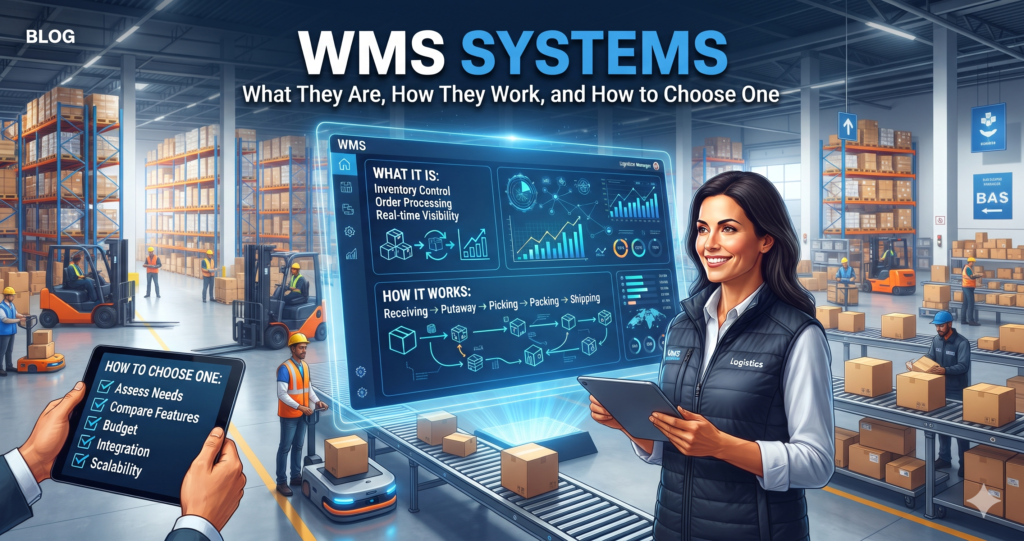
WMS Systems: What They Are, How They Work, and How to Choose One
A warehouse management system (WMS) is software that plans, directs, and records the work inside a warehouse, from the moment goods arrive to the moment an order ships. It tracks where every item is, tells workers what to do next, and keeps the records accurate as stock moves through the building.
WMS systems is the name for the whole category of warehouse management software, and the products in it range from simple tools for a single small warehouse to large platforms for global distribution networks. This guide is written for operations managers, ecommerce sellers, and small distributors who want to understand what these systems do before they talk to vendors. It is vendor-neutral and does not rank products. Instead, it explains the workflows, features, types, costs, and measures you need to choose and roll out a system with confidence.
What Is a WMS?
A warehouse management system is software that plans, directs, and records warehouse work, covering receiving, storage, inventory control, picking, packing, and shipping. It acts as the operating layer of a warehouse: it knows what is in stock, where it sits, which task is next, and who should do it.
In short: A WMS is software that directs and records everything that happens to goods inside a warehouse, so the right item is in the right place at the right time.
It differs from a basic inventory tracker in an important way. A tracker records stock levels. A WMS makes decisions. It can prioritize tasks, plan picking routes, check each scan against the order, enforce rules, and keep a record of what happened, by whom, and when. That decision-making role is why a growing warehouse often outgrows a simple tracking tool.
What a WMS Is Not
A WMS is not an ERP. An ERP, or enterprise resource planning system, is the financial and administrative system of record for the whole company. A WMS focuses on the physical work in the warehouse and shares information with the ERP. A WMS is also not a transportation management system (TMS), which handles carrier selection, shipping rates, and routing for freight. Many companies run a WMS alongside both.
How a WMS Works: Core Warehouse Workflows
Most WMS systems guide the same six workflows. Each can be configured to match your layout, staff, and service levels.
- Receiving. The system matches incoming goods against purchase orders or advance ship notices, records what actually arrived, and flags differences. It can print labels at the dock and capture lot or serial numbers, so problems are caught at the door rather than weeks later.
- Put-away. Once goods are received, the WMS directs workers to the best storage location using rules such as how fast an item sells, its size and weight, and how close it should be to the picking area. Good put-away rules reduce walking and congestion.
- Inventory control and slotting. The system tracks stock by location, status, and attributes such as lot or expiry date. It supports cycle counting, which checks small sections of inventory on a rolling basis, and replenishment of picking locations. Slotting analysis uses order history and item dimensions to place fast-moving items closer to where they are picked.
- Picking. The WMS assigns pick tasks, plans routes, and validates each scan. Common methods include discrete picking (one order at a time), batch picking (several orders at once), zone picking (workers stay in an area), and wave picking (groups of orders released together).
- Packing and shipping. At pack-out, the system checks items against the order, records weights and dimensions, and prints labels and documents. Cartonization logic can suggest the right box size to cut freight and filler costs. Shipment confirmation then flows back to the ERP.
- Returns and adjustments. For returned goods, the WMS guides inspection and decides whether an item is restocked, held, repaired, or scrapped. Stock adjustments require a reason code and, for sensitive transactions, often a supervisor approval, which keeps the records defensible.
How a WMS Connects to ERP, TMS, and WES
Warehouses rarely run in isolation. The WMS usually sits between the ERP and logistics tools. The ERP stays the system of record for finances, product data, and orders. The WMS carries out the physical work against those orders and posts confirmations and inventory updates back to the ERP. A TMS, where used, handles carrier selection and shipping labels. In busy facilities with automation such as conveyors or robots, a warehouse execution system (WES) coordinates the machines while the WMS supplies the plan. Getting these hand-offs right is mostly a data question, and our guide to ERP integration explains how connected systems share information.
Core Features of WMS Systems
Feature lists differ by product, but these are the capabilities buyers most often look for.
| Feature | What it does | Why it matters |
|---|---|---|
| Barcode and RFID scanning | Captures item, location, and task data at each step | Gives accurate records and catches mistakes when they happen |
| Real-time inventory by location | Shows what is in stock and exactly where | Cuts time spent hunting for items and reduces stock-outs |
| Receiving and put-away rules | Matches deliveries to orders and chooses storage locations | Prevents errors at the door and shortens walking distances |
| Slotting | Assigns items to locations based on sales history and size | Speeds up picking and reduces congestion |
| Picking methods | Supports discrete, batch, zone, and wave picking | Lets you match the method to your order profile |
| Packing and cartonization | Verifies orders and suggests box sizes | Reduces shipping errors, packaging waste, and freight cost |
| Shipping and carrier integration | Produces labels, manifests, and documents | Keeps shipments compliant and reduces manual data entry |
| Returns processing | Guides inspection and disposition of returned goods | Protects margins and shows why returns happen |
| Labor management and task assignment | Assigns work and tracks how efficiently it is done | Helps balance staffing and highlights bottlenecks |
| Reporting and analytics | Turns scans and tasks into dashboards and KPIs | Supports decisions with facts instead of guesses |
Depth varies widely. One product may offer a simple set of rules while another supports complex wave planning, so test each feature against your own processes rather than relying on the checklist alone.
Types of WMS Systems
There is more than one way to classify WMS systems, which is why guides disagree on how many types exist. Some count three and others count four, depending on whether cloud is treated as its own type. It is clearer to use two lenses: architecture (how the WMS is built and where it sits) and deployment (where it runs).
| Type | What it is | Strengths | Trade-offs | Best fit |
|---|---|---|---|---|
| Standalone WMS | An independent application focused only on warehouse operations | Deep warehouse features and flexible configuration | Needs integration with your ERP and other systems | Operations with complex warehouse processes |
| ERP module | A warehouse function built into an ERP suite | Tight data alignment with finance and purchasing; one vendor | Warehouse features may be less advanced | Companies that want one system and simpler processes |
| Supply chain suite module | A WMS bundled with transport and planning tools | Coordinated view across the supply chain | Can be heavier and costlier to run | Larger networks with several logistics functions |
| Cloud WMS | Hosted by the vendor and accessed online | Faster updates, easier scaling, less infrastructure to manage | Subscription fees; reliance on internet connectivity | Growing businesses without a large IT team |
| On-premises WMS | Installed on your own servers | Local control and low latency | Higher upfront cost and you handle maintenance | Regulated or highly controlled environments |
The first three rows describe architecture and the last two describe deployment, so a system can be both, for example a standalone WMS delivered through the cloud. The label matters less than the integration quality, the fit with your processes, and how the system behaves when something goes wrong.
WMS vs ERP Inventory vs Inventory Software
Many businesses ask whether they need a WMS at all, or whether an inventory app or the inventory module in their ERP is enough. This table gives a starting point.
| Option | Typical signs it fits | Likely fit | Watch out for |
|---|---|---|---|
| Spreadsheet or basic inventory app | One small location, few SKUs, low order volume | Simple tracking of stock levels | Counts drift as volume grows; no guided tasks |
| ERP inventory module | Moderate volume, need for stock and order data tied to finance | Records and basic location control in one system | Limited guidance for picking, slotting, and labor |
| Standalone or advanced WMS | Many SKUs or locations, high order volume, frequent mis-picks, need for directed tasks | Full warehouse execution with rules and analytics | Setup effort, integration work, and cost |
It also helps to define the neighbors in a sentence each. A transportation management system plans and books freight. A warehouse execution system coordinates automated equipment. A labor management system measures how efficiently people carry out warehouse tasks, using task data that a WMS often supplies. For the basics of tracking stock before you add a WMS, see our guide to warehouse inventory management.
Benefits of a WMS
Better inventory accuracy. Scanning each movement and checking it against rules reduces the gap between what the system says and what is on the shelf. That can lower safety stock, write-offs, and the time spent searching for missing items.
Faster, more accurate picking. Directed tasks, planned routes, and scan validation help workers pick the right item the first time, which reduces rework and late orders.
Better use of labor. Seeing where work is backing up lets supervisors move people to where they are needed, and it shows which processes need attention.
Handling of peaks. Rules for priorities and workloads make it easier to cope when order volume jumps. Seasonal and promotional spikes are a good example, and our guide to retail promotions shows how they affect stock and, in turn, warehouse workload.
Traceability. A record of who did what, when, and with which lot or serial number supports quality checks, recalls, and audits.
Vendors often publish average gains in productivity, space use, or stock efficiency, and these figures vary widely and are rarely accompanied by a clear source. Treat them as claims to validate in a pilot against your own baseline, not as promises.
Key WMS KPIs and Formulas
Measures give you a baseline before you buy and proof of progress after go-live. Definitions differ between businesses, so write down exactly how you calculate each one.
| Metric | Formula | How to read it |
|---|---|---|
| Inventory accuracy (%) | Locations or SKUs counted correctly / total counted x 100 | Higher is better. Falling accuracy points to receiving, put-away, or counting problems. |
| Dock-to-stock time | Time put-away is completed minus time of receipt | Shows how quickly received goods become available to sell. |
| Order cycle time | Time shipped minus time order released | Shows how long an order takes to move through the warehouse. |
| Picks per labor hour | Pick lines completed / labor hours | Measures picking productivity. Compare like with like, since task types differ. |
| Mis-pick rate (%) | Incorrect picks / total picks x 100 | Lower is better. A rising rate may signal slotting, training, or scanning issues. |
| On-time-in-full (%) | Orders shipped on time and complete / total orders x 100 | Reflects service levels as the customer experiences them. |
No single metric tells the whole story. Fast picking with many errors is not a win, so read productivity and accuracy together. For more on the inventory side of measurement, see our guide to inventory control methods and KPIs, and consider business process monitoring to track processes from end to end.
What Does a WMS Cost?
Published cost figures vary enormously. Estimates from vendors and review sites range from a few thousand dollars to hundreds of thousands of dollars, depending on the product tier, the scope of the project, and how much customization and integration is needed. Vendors usually quote on request, so the useful question is what the whole project will cost over several years. This table lists the drivers to ask about.
| Driver | What it includes | Question to ask |
|---|---|---|
| Subscription or license | Recurring fees for cloud systems, or a license for on-premises software | How is pricing set: by user, by site, by module, or by transaction? |
| Implementation and configuration | Setting up workflows, rules, and layouts | What is included, and is it fixed price or billed by time? |
| Integrations | Connecting to the ERP, shipping tools, and ecommerce platforms | Are connectors included and who maintains them after upgrades? |
| Hardware | Handheld scanners, printers, label stock, and network coverage | What devices does the software support and what will we need to buy? |
| Data preparation | Cleaning item records, units of measure, and location names | Who does it and how long will it take? |
| Training | Preparing supervisors and workers | Is training included and how many people does it cover? |
| Support and upgrades | Ongoing help, fixes, and new versions | What do support tiers cost and how often are upgrades required? |
Ask every vendor for a written quote that covers each line above. Comparing headline subscription prices alone will mislead you, because hardware, integration, and data preparation can add as much as the software itself.
How to Choose and Implement a WMS
Signs You May Need a WMS
- Stock counts keep drifting from what is on the shelves.
- Picking is slow and workers spend time searching for items.
- Mis-picks and shipping errors are rising.
- You are adding SKUs, locations, or sales channels faster than your processes can keep up.
- Spreadsheets and manual paperwork can no longer keep pace.
If several of these apply, small business automation of your warehouse processes may be a sensible next step, starting with the tool that solves your most costly problem.
Selection Steps
- Define your goals. Decide which problems matter most, such as accuracy, speed, or labor cost.
- Map your processes. Document how receiving, put-away, picking, and shipping work today.
- Check ERP integration. Confirm how the WMS will exchange orders, inventory, and confirmations with your ERP.
- Run scripted demos. Ask vendors to walk through your own scenarios, including awkward edge cases such as duplicate serial numbers, negative stock, and late changes to advance ship notices.
- Check references. Talk to companies with similar warehouses about how the rollout went.
- Compare total cost. Use the cost table above and include hardware and integration.
Rollout
- Clean your data. Standardize item records, units of measure, and location names before go-live.
- Plan devices and labels. Choose scanners and printers that suit your workers and test label formats in every scenario.
- Pilot one process. Start with a focused process such as receiving or cycle counting to prove value and expose integration gaps.
- Integrate. Connect the WMS to your ERP and shipping tools and test the hand-offs.
- Train. Involve experienced staff early and build training into the plan.
- Measure. Track the KPIs above against your baseline and adjust.
Three pitfalls come up often. The first is underestimating data clean-up, since a WMS will amplify messy data rather than fix it. The second is over-customizing before you have learned how the standard workflows perform. The third is ignoring the device experience, since slow scanners and weak wireless coverage can sink adoption.
What Is Changing in WMS Systems
Vendor guides describe several trends. Some systems use artificial intelligence to forecast labor needs, balance work, and suggest slotting changes. Warehouse automation such as autonomous mobile robots and automated storage is spreading, and a warehouse execution system coordinates it with the WMS. RFID is maturing in targeted uses. These are vendor-described trends, so verify any claim in a pilot. For a broader look at intelligent features entering operations software, read our guide to AI-driven ERP systems.
Frequently Asked Questions
What is a WMS?
A WMS, or warehouse management system, is software that plans, directs, and records warehouse work, including receiving, storage, picking, packing, and shipping. It tells workers what to do next and keeps inventory records accurate as goods move.
Is a WMS the same as inventory management software or an ERP?
No. Inventory software mainly records stock levels. An ERP is the company-wide financial and administrative system. A WMS directs the physical work in the warehouse, and it usually exchanges data with the ERP rather than replacing it.
What are the main types of WMS?
By architecture, the main types are standalone systems, ERP modules, and supply chain suite modules. By deployment, WMS systems run in the cloud or on-premises. Guides count three or four types depending on how they group these options.
Do small businesses need a WMS?
Not always. A small operation with few SKUs and low volume may manage with a spreadsheet or an ERP inventory module. A WMS makes sense when counts drift, mis-picks rise, or growth outpaces manual methods.
How long does WMS implementation take?
It depends on scope and readiness. A focused pilot can be much shorter than a full multi-process or multi-site rollout. Clean data, quick decisions, and early involvement of warehouse staff usually shorten the project.
How much does a WMS cost?
Cost depends on the product tier, number of users or sites, integrations, hardware, data preparation, training, and support. Vendors usually quote on request, so compare written quotes that cover every cost driver rather than headline prices.
Conclusion
A warehouse management system directs and records the work of receiving, storing, picking, and shipping goods so that stock is accurate and orders go out right. Start by defining your process problems and measuring a baseline, then choose the simplest type of system that solves them. Clean data, a focused pilot, and careful integration with your ERP matter more than any feature list. If you would like help connecting warehouse tools to your other systems and automating the workflows around them, our process automation consulting team can help.