
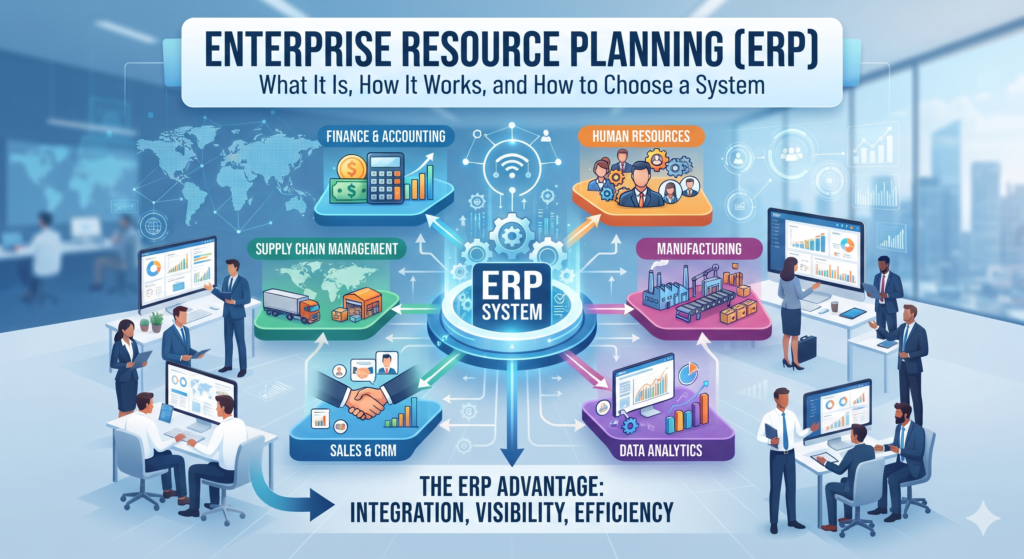
Enterprise resource planning (ERP) is software that connects a company’s core processes, such as finance, purchasing, inventory, sales, and HR, on one shared database so every team works from the same current information. Instead of separate spreadsheets and apps that disagree with each other, an ERP gives the business a single record of each customer, item, order, and payment.
ERP is a category of software, not a single product. Vendors package it in different ways, and the right setup for a 40-person distributor looks very different from the right setup for a multinational. This guide is written for owners and for operations and finance leads at growing companies. It explains what ERP is, how it works, which modules matter, how it differs from CRM and accounting software, what it costs to own, and how to choose and roll one out without the common mistakes.
What Is Enterprise Resource Planning (ERP)?
Enterprise resource planning is a type of business software that integrates the main functions of a company, including accounting, purchasing, inventory, order handling, manufacturing, sales, and human resources, into one system built around a shared database. When something changes in one area, such as an order being shipped, the rest of the system sees it at once.
In short: ERP is integrated business software that runs a company’s core processes on one shared database, so finance, operations, and sales all work from the same real-time data.
It helps to separate three terms that people often blur together. ERP software is the product a vendor sells. An ERP system is that product after it has been configured for your company and is running. An ERP project is the work of choosing, setting up, and rolling out the system, which usually takes more effort than buying the software itself.
The idea has a long history. Its roots go back to the 1960s, when manufacturers began using software to manage inventory and production planning, and those tools grew into material requirements planning (MRP). IBM and NetSuite both report that the research firm Gartner coined the term enterprise resource planning in 1990 to describe software that extended these ideas beyond the factory floor to finance, HR, and other functions.
It is just as important to say what ERP is not. It is not a single application, and it is not only accounting software. Accounting is one module inside a full ERP, alongside many others.
What Does ERP Stand For?
ERP stands for enterprise resource planning. The word enterprise does not mean the software is only for large companies. Cloud options have made ERP practical for small and midsize businesses as well.
How an ERP System Works
An ERP system works by combining three things: one shared database, a set of modules that read from and write to that database, and built-in workflows that move work from one team to the next. Because every module uses the same data, a customer’s details, an item’s stock level, or an invoice’s status exists in one place rather than in several copies. The idea of connecting systems this way is covered in more depth in our overview of integrated software solutions.
Other parts of the design matter too. Updates happen in real time, so a sale made today shows up in inventory and finance reports today. Role-based access means each person sees the dashboards and records they need and not everything else. Rules built into the workflows can trigger actions automatically, such as creating a purchase order when stock falls below a set level.
The easiest way to see this is to follow two common processes through the system.
Order-to-cash covers everything from a customer order to money in the bank:
- The order is received and recorded (sales or order management module).
- The system checks whether the items are in stock (inventory module).
- Stock is reserved for the order (inventory module).
- The order is picked, packed, and shipped (warehouse and supply chain module).
- An invoice is issued (finance module).
- The customer’s payment is applied to the invoice (finance module, accounts receivable).
- The general ledger and reports update (finance and reporting modules).
Procure-to-pay covers buying what the business needs and paying for it:
- Stock falls below a set level and triggers a reorder (inventory module).
- A purchase order is created and sent to the supplier (procurement module).
- The goods arrive and are recorded as received (inventory or warehouse module).
- The supplier’s invoice is matched against the order and the receipt (finance module, accounts payable).
- Payment is approved and made (finance module).
- The ledger is updated (finance module).
Compare that with disconnected tools, where each step might live in a different spreadsheet or app and someone has to re-type the same information at every hand-off. The shared database is what removes that re-keying and the errors that come with it.
Core ERP Modules
Modules are the building blocks of an ERP. Each one handles a specific part of the business, and all of them share the same database. The exact set varies by vendor, and most companies start with finance and add others as they grow.
| Module | What it handles | Typical users |
|---|---|---|
| Finance and accounting | General ledger, accounts payable and receivable, reconciliation, financial reporting | Finance team, controllers |
| Procurement | Purchasing, supplier records, purchase orders, quotes | Purchasing and operations |
| Inventory management | Stock levels by item and location, reorder points, valuation | Operations, warehouse, finance |
| Order management | Order entry, prioritization, tracking through delivery | Sales operations, customer service |
| Manufacturing | Production planning, work in progress, materials planning | Production planners, plant managers |
| Warehouse and supply chain | Receiving, picking, shipping, flow of goods from supplier to customer | Warehouse and logistics teams |
| Sales and CRM | Customer records, leads, communication history | Sales and support teams |
| Human resources and payroll | Employee records, time and attendance, payroll, performance reviews | HR and payroll |
| Project and service management | Project planning, time and resource tracking, client billing | Service firms, project managers |
| Reporting and analytics | Dashboards, KPIs, cross-department reports | Executives, department heads |
Finance and inventory are closely linked. The way a company values its stock changes its reported cost of goods sold and its profit, so the inventory costing method you choose matters as much as the software that records it. On the operations side, the practical side of tracking stock is covered in our guide to warehouse inventory management.
ERP vs CRM, Accounting Software, MRP, and Supply Chain Software
ERP is often confused with other business systems because they overlap. This table separates the common ones.
| System | Main job | Scope | Relationship to ERP |
|---|---|---|---|
| ERP | Run core business processes on one shared database | Company-wide | The central system |
| CRM | Manage relationships with leads and customers | Sales, marketing, support | Often connected to ERP; many companies use both |
| Accounting software | Record and report financial transactions | Finance only | Usually becomes one module inside an ERP |
| MRP | Plan materials and production for manufacturing | Manufacturing | The earlier ancestor of ERP |
| Supply chain management | Coordinate suppliers, inventory, and shipping | Procurement and logistics | A module in many ERPs, or a separate system |
| HR management system | Manage employee records, payroll, and benefits | HR | A module in many ERPs, or a separate system |
The most common question is how ERP differs from CRM. A CRM focuses on relationships: leads, sales activity, and customer interactions. An ERP also covers what happens after a deal closes, including fulfillment, billing, inventory, and finance. Many companies use both, and the value comes from connecting them so sales can see stock levels and finance can see sales data. Our guide to CRM and ERP integration explains how that connection works.
Accounting software deserves a separate note. It records and reports financial transactions, and a full ERP includes accounting as one of many modules. Businesses that outgrow standalone accounting tools often find the next step is connecting those tools to their other systems or moving to an ERP. Our guide to CRM and accounting integration covers that path.
Types of ERP: Cloud, On-Premises, and Hybrid
ERP systems are usually grouped by where they run and who maintains them.
| Deployment | How it works | Strengths | Trade-offs | Best fit |
|---|---|---|---|---|
| Cloud | Hosted by the vendor and accessed through a web browser, usually on a subscription | Lower upfront cost, vendor handles updates and maintenance, access from anywhere | Ongoing subscription fees; you rely on the vendor for security and uptime | Growing small and midsize companies without a large IT team |
| On-premises | Installed on your own servers and run by your own IT staff | Full control over the system and data, deep customization | Higher upfront cost, you own maintenance and upgrades, needs dedicated IT skills | Organizations with strict control needs and strong IT resources |
| Hybrid | Some applications in the cloud and some on-premises | Keeps existing systems while adding cloud capabilities | Integration between the two sides can be hard to manage | Companies moving gradually or keeping some processes in-house |
Two related models are worth knowing. Two-tier ERP is an approach where a large company keeps a main ERP at headquarters and runs lighter systems, often cloud-based, at subsidiaries or regional offices, with the two connected. Open source ERP is a low-cost or free alternative, but support from the provider is usually minimal, and the company needs technical staff who can configure and improve the system.
Industry guides such as CIO.com also group ERP vendors into tiers by customer size, with large global enterprises at the top tier and small businesses, often with a focus on accounting, at the bottom. Knowing roughly which tier you belong to helps narrow the field before you start comparing products.
Benefits of ERP
One source of truth. When every department works from the same database, there is no argument about whose spreadsheet is right. Reports match because they draw on the same records.
Less manual re-entry. Information is typed once and flows to every module that needs it, which cuts the time spent on duplicate entry and reduces typing errors.
Consistent reporting. Finance, operations, and sales can all pull reports from the same data, which makes it easier to track performance and compare results across teams.
A clearer audit trail. Systems that record each transaction and its approvals make it easier to see who did what and when, which supports internal controls and compliance work.
Room to scale. Because ERP is modular, a company can start with the essentials and add functions as it grows, instead of replacing everything at once.
For a sense of how users judge the results, NetSuite cites Panorama Consulting Group’s 2025 ERP Report, in which two-thirds of respondents said their ERP improved key processes. This is a vendor-cited figure, so treat it as one data point rather than a guarantee for your own project.
Common ERP Challenges and Risks
An ERP project is a major change, and most of the problems are predictable.
- Data migration and clean-up. Moving records from old systems into a new one takes time, and bad data moved into a new system is still bad data. Plan for conversion and clean-up early.
- Change resistance and training. People who are used to their own spreadsheets may push back. Role-based training and clear explanations of what is changing help adoption.
- Over-customization. Heavy customization makes the system harder to upgrade and support. Many vendors build their standard workflows from common best practices, so it is usually wise to limit changes to what the business truly needs.
- Integration upkeep. If you keep some existing tools and connect them to the ERP, the connectors need attention. Upgrades to either side can break a connector or require rework, and some connectors sync in real time while others only sync daily or weekly.
- Cost beyond the license. Implementation, migration, training, integrations, and support all add to the total. The cost section below breaks these down.
- ERP does not fix broken processes. An ERP can make a good process faster and expose a bad one, but it will not repair a confusing or inefficient workflow on its own. Review how work actually flows before you automate it, and consider business process monitoring to see where delays and errors occur today.
What Does ERP Cost? Total Cost of Ownership
ERP pricing varies widely by vendor, the modules you choose, the number of users, and the deployment model. Vendors generally quote on request, so the useful question is not what the software costs but what the whole project costs over several years. This table lists the cost categories to ask about.
| Category | What it includes | Question to ask the vendor |
|---|---|---|
| Subscription or license | Recurring fees for cloud, or a one-time license for on-premises | How is pricing calculated: by user, by module, or by usage? |
| Implementation and configuration | Setting up the system to match your processes | Is this fixed price or time and materials, and what is in scope? |
| Data migration | Cleaning and moving records from old systems | Who does the migration, and what happens if data quality is poor? |
| Integrations | Connecting the ERP to CRM, ecommerce, payroll, and other tools | Are connectors included, and who maintains them after upgrades? |
| Customization | Changes beyond standard configuration | What will customization do to future upgrades? |
| Training | Learning for users and administrators | Is training included, and how many people does it cover? |
| Hardware | Servers and infrastructure, mainly for on-premises systems | What hardware and IT staffing will we need? |
| Support and upgrades | Ongoing help, maintenance, and new versions | What do support tiers cost, and how often are upgrades required? |
Cloud systems usually have lower upfront costs than on-premises systems because there is no hardware to buy and no system experts to hire. On-premises systems usually cost more upfront and shift maintenance to your own team. Ask each vendor for a written quote that covers every line above so that you can compare options fairly.
How to Choose and Implement an ERP System
Signs You May Need an ERP
- Your team spends hours re-typing the same data into different tools.
- Reconciling numbers across spreadsheets slows down your month-end close.
- Reports from different teams disagree, and nobody is sure which is right.
- Inventory counts no longer match what is on the shelf.
- Growth is straining your current tools, for example new locations or more staff.
If several of these sound familiar, you may be at the point where small business automation alone is no longer enough and a connected system is worth evaluating.
Selection Steps
- Document your needs. List the processes the system must support, who will use it, and which problems you want to solve first.
- Map your processes. Write down how work actually flows today, including the awkward workarounds.
- Build a shortlist. Look for vendors with proven experience in your industry and at your size.
- Run scripted demos. Ask each vendor to walk through your own scenarios, not a generic demo.
- Check references. Speak with companies similar to yours about how the project went.
- Compare total cost. Use the cost table above, and include implementation, training, and support.
Implementation Phases
- Discovery. Confirm goals, scope, and who is responsible for what.
- Configuration. Set up the system to match your processes, keeping customization to a minimum.
- Data migration. Clean and move your records, and plan integrations early. If you are keeping other tools in place, a partner offering custom CRM and automation services can help connect them to the ERP.
- Testing. Run real scenarios from start to finish and fix problems before go-live.
- Training. Teach each group the parts of the system they will use.
- Go-live and review. Launch, support users closely, and review results after the first weeks.
Many companies roll out in phases, starting with finance and the most important operational modules and adding others later. That keeps each stage manageable and lets the team learn as it goes.
ERP and AI: What Is Realistic
Vendors increasingly build artificial intelligence into ERP products. Reasonable uses today include automating routine entries, flagging unusual transactions, and supporting forecasts. Some vendors also describe AI agents that carry out multistep tasks within approval rules the business sets. Treat these as features to test in a pilot rather than promises, and remember that AI depends on clean, shared data, which brings you back to data quality. For a closer look at this topic, read our guide to AI-driven ERP systems.
Frequently Asked Questions
What does ERP stand for?
ERP stands for enterprise resource planning. The term was coined by the research firm Gartner in 1990, as IBM and NetSuite report, to describe software that connects the main functions of a business in one system.
What is ERP in simple terms?
ERP is software that keeps a company’s main functions, such as finance, inventory, sales, and HR, in one shared database. Everyone works from the same current data, which reduces duplicate entry and makes reports more consistent.
Is ERP only for large companies?
No. ERP was once limited to large organizations, but cloud subscriptions and options designed for small and midsize businesses have made it practical for smaller companies too. The right choice depends on complexity and growth, not just headcount.
How is ERP different from CRM?
A CRM manages relationships with leads and customers, such as sales activity and support history. An ERP covers internal operations, including finance, inventory, fulfillment, and billing. Many companies use both and connect them.
What is the difference between cloud and on-premises ERP?
Cloud ERP is hosted and maintained by the vendor and accessed online, usually for a subscription. On-premises ERP runs on your own servers and is maintained by your own team, which gives more control but needs more IT resources.
How long does ERP implementation take?
It varies. The main factors are the number of modules, the amount of data to migrate, how much customization you need, the number of locations, and how ready your team is. A narrow first phase takes less time than a full multi-site rollout.
How much does ERP cost?
Cost depends on the vendor, modules, number of users, deployment model, and how much implementation, migration, integration, and training you need. Vendors usually quote on request, so compare written quotes that cover every cost category.
Conclusion
Enterprise resource planning connects a company’s core processes on one shared database so that finance, operations, and sales work from the same information. The right system starts with your own processes and data, then picks modules and a deployment model to match. Keep customization modest, plan for migration and training, and measure results after go-live. If you would like help connecting your systems and automating the workflows around them, our process automation consulting team can help.